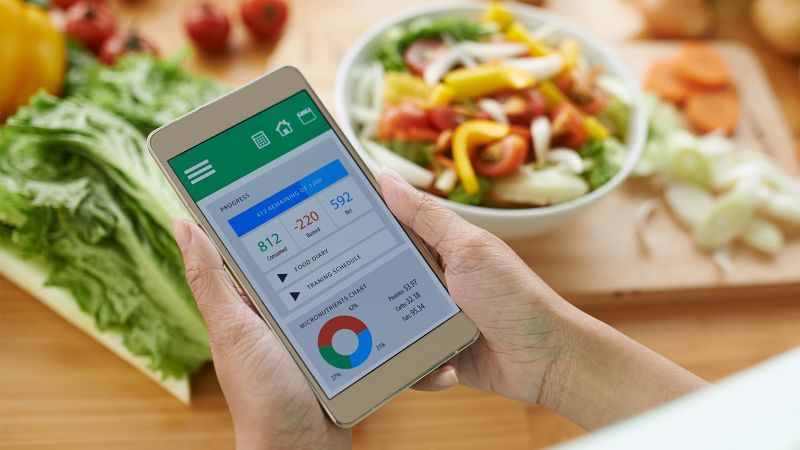

A recent global study by Ipsos carried out across 30 countries found that 45% of people globally say they are currently trying to lose weight. According to the CDC’s Centers for Disease Control and Prevention, people who lose weight gradually and steadily (about 1 to 2 pounds per week) are more successful at keeping weight off. Using a weight loss app on your smartphone or laptop computer can help, giving you a convenient and reliable way to track your slow but steady progress.
“Weight loss apps can be a great way to help adults be aware of their nutrition and lifestyle habits,” says Jaime Coffey Martinez, MS, RD, owner and founder of Nutrition CPR LLC, a health and wellness center. Martinez is a Registered Dietician with over 20 years of experience in the fields of medical nutrition therapy, weight loss, functional medicine, sports nutrition, corporate wellness and fitness, private nutrition coaching, and pharmaceuticals. “In addition to tracking your food intake,” continues Martinez, “many offer support forums, recipes and an ability to sync with other apps such as fitness trackers and smart scales. These are all beneficial tools in an individual’s weight loss journey.”
To find the best weight loss app, we tested five candidates over the course of five weeks. On our list were the premium (i.e., paid) versions of LoseIt! Premium, MyFitnessPal Premium, MyNetDiary Premium, Noom and WW (formerly, Weight Watchers). We tested each of them for ease of setup, design, features and cost.
We learned two important things during testing: 1) all of the apps can help you track your food intake and activity levels, and 2) some apps are easier to use and update. After our testing was complete, we named LoseIt! Premium the winner because of its simplicity, intuitiveness, and affordability.
Best weight loss app overall
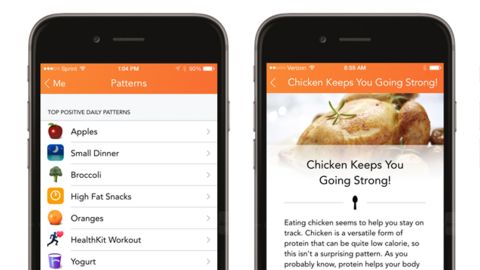
We found LoseIt! Premium to be simple and intuitive, and the most affordable of the weight loss apps we tested. It offers robust support for its user community, with active nutrition- and weight loss-related user forum discussions.
LoseIt! Premium’s beauty is in its simplicity. During testing, we noted that this app’s primary focus is on losing weight. It offers personalized weight loss plans, meal and exercise planning and food logging. Its home screen was a diary of the food we ate that day. Entering our food consumption was a simple matter of just touching the “Add” button for the meal, and then entering the details of each food item at the top of the screen.
The LoseIt! Premium app included branded food and drink items, so we were able to enter the brand name of a food — such as Wegmans Pulled Pork Barbecue — and get the number of calories in it. Likewise, we could look for something — such as Bacardi Black Dark Rum — and compare its calories with other types of dark rum. This prevented us from being in a quandary over which item to buy while we shopped.
An important, but often overlooked, capability of a great weight loss app is its ability to let a user make changes quickly and easily; the LoseIt! Premium app gave us this ability. With some other apps we tested, if we mistakenly entered the wrong food name, then removing the entry was often complicated, sometimes seemingly impossible. But edits we made in the LoseIt! Premium app were simple and intuitive.
To make changes, we just clicked on an entry. To remove an entry, we just clicked the “X” on the right-hand side in the web app or we slid the entry to the left in the mobile app and touched “Delete.”
We were able to add activity, including exercise, manually during testing. You could also add activity through the use of a wearable device such as an Apple Watch. The app incorporated our activity in its calorie calculations, meaning we could offset what we ate through activity.
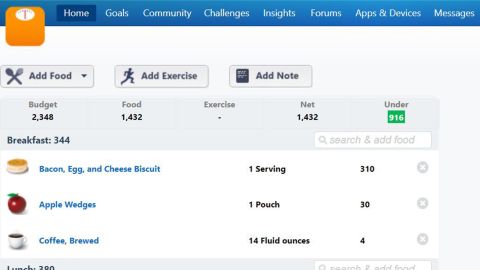
LoseIt! Premium also includes robust goal-setting features and support for a community of users. We noted its many lively discussion forums, which were nutrition- and weight loss-related rather than the random discussions we often found in the other apps.
You can use LoseIt! Premium as both a web app and a mobile app for Android or iOS mobile devices. LoseIt! Premium also offers integration with running apps Runkeeper and Strava.
You can sign up for a seven-day free trial. You can stay with the free version of LoseIt!, but know that it offers fewer features than the Premium app. The Premium (or paid) account option starts off at $39.99 per year, which is the least expensive of the weight loss apps we tested. You can also sign up for a lifetime Premium membership for $149.99.
In a recent report from the U.S. Centers for Disease Control and Prevention, it was found that few Americans eat close to their daily recommendations of fruits and vegetables. One of the ways you can be sure you’re eating enough fruits and vegetables is by tracking your intake in a weight loss app. While there are differences in their approach, all of the weight loss apps we tested depend on you accurately tracking your food intake and recording it in the app. This alone can be crucial to your overall weight loss journey, if only because it can be so easy to forget what and how much you ate if you don’t consistently track it.
“The main features of most apps are tracking and goal setting,” says Evan M. Forman, Ph.D., Professor of Psychological and Brain Sciences and Director of the Center for Weight, Eating and Lifestyle Science (the WELL Center) at Drexel University. Dr. Forman is also the author of a clinician guide and workbook called “Effective Weight Loss: An Acceptance-based Behavior Approach” for Oxford University Press’s Treatments that Work series. “Those are important features, but they are not going to be enough for most people,” continues Dr. Forman.
“For example, it takes a lot of effort to track everything you eat, and even more effort to do it accurately (which requires a good deal of weighing and measuring). So, most people will need help with motivation, whether in the form of cognitive-behavioral skills or someone to whom they are accountable. They also may need an expert coach who can review their food records for accuracy and to make suggestions.”
Nutrition CPR’s Jaime Coffey Martinez agrees, adding that people need to keep in mind that weight loss apps are not an exact science into your nutrition, but instead, “more of a window into your intake and habits.”
Martinez points out that some apps allow individuals to enter a food into the database and the nutrition information may not be entered correctly, causing totals and tracking to be incorrect. In our testing, the better weight loss apps did link to cloud-based databases that contained the calorie content of thousands of foods and other consumables. They showed us the value of standard servings and they even showed us the effect of differing preparation methods, such as whether a food is fried, broiled or eaten raw.
Unfortunately, some of the apps we tested did indeed have databases with errors or poorly chosen serving sizes. This is the reason why you should remain realistic about what weight loss apps can do for you.
“I recommend clients use them as a tool but not the holy grail when reviewing their nutrition,” says Martinez. “My biggest piece of advice for clients when using weight loss apps is to not get wrapped around the axle with numbers. Clients can become ‘numbers obsessed’ and can develop an unhealthy relationship with food. Instead, use them as a guide and to help with accountability. Remember, it is about the journey, not one food or one entry.”
When it comes to choosing the right weight loss app for you, Nutrition CPR’s Jaime Coffey Martinez and Drexel University’s Dr. Evan M. Forman have some advice. Martinez says to make sure it includes “the ability to sync with other apps and devices” to track physical activity.
According to Martinez, weight loss apps are particularly helpful tools because they can provide accountability, motivation and structure to help individuals achieve their overall fitness and healthy lifestyle goals.
“Apps allow tracking of not only calories but, more importantly, macronutrient balances (carbs, proteins and fats) and habits such as the timing of your meals and snacking,” explains Martinez. “In addition, many apps also track fiber, sugar, water and specific nutrients,” she continues, “which can be instrumental in a targeted approach to proper nutrition based on goals and medical history. The ability to also track lifestyle habits, and sync with other health apps and devices, addresses a multifaceted approach to weight loss.”
Dr. Forman points out that tracking everything you eat is hard work, so you want an app that makes this as easy as possible. “For instance, you should choose an app that has foods that you eat (whether branded or not) in its tracking database,” he says. “Also, you want an app that makes it easy to create and save custom foods, recipes, and meals because that’s a real timesaver.”
He also advises to make sure the app you choose includes easy ways to sync your weight and physical activity, if you track those using wireless devices like a wireless scale or an activity band or watch. “In addition, many people will benefit from an app that will help you develop important cognitive-behavioral skills and strategies,” he says.
According to Dr. Forman, people should choose apps that have coaches because they “will help you be successful both in terms of guidance and in terms of accountability,” he explains. “Having regular meetings with a coach is one of the best ways to keep yourself accountable.”
When all is said and done, people need to remain realistic about what weight loss apps can do for them. These apps don’t always help bring about massive weight loss for everyone who uses them.
“Weight loss apps are the most convenient, least expensive and therefore most popular method of losing weight,” says Dr. Forman. “[But] if an app doesn’t work for you, don’t give up,” he advises. “Weight loss and weight loss maintenance are supremely difficult and you may well need professional help.”
During our pre-testing research, we found there are many different weight loss apps available for download. We selected our five candidates by making sure they were all subscription-based, either paid monthly or annually.
We made sure all five apps we selected could run on both Android or iOS devices and can be used through their respective websites from a desktop or laptop computer. The apps all needed an active connection to the internet to retrieve information such as calorie counts and to their respective cloud services to store their data.
We installed each of the five apps to our iPhone 13 Pro smartphone running iOS 15.5. The web apps were reached using a variety of browsers running on computers running Microsoft Windows 10 or 11.
We tested each of them with the following criteria in mind: ease of installation and setup, ease of use, design, features offered and cost.
To start testing, we first created an account with each app and initiated the sign-up process. Each of the apps required a signup process that included questions about current height, weight and gender, goals, and in some cases more details about lifestyles and activity. Despite being provided identical information, each of the apps produced different weight loss strategies and different durations, and all suggested different goals.
We tested all five apps by recording meals over the course of five weeks, entering food items into each one at the conclusion of each meal. We depended on the nutrition information contained in each app’s database or we entered nutrition information for foods not contained in the database.
Lastly, we then checked out the user forums the apps provided, if any, and noted how helpful the topics discussed were.
MyFitnessPal is a complete calorie counter that also helps keep track of your activity. Food tracking uses a detailed and expansive database with hundreds of millions of entries. Exercise tracking, likewise, includes detailed choices such as a choice of 16 entries under the “Walking” section.
MyFitnessPal Premium offers food analysis tools, exercise tracking tools, individualized coaching, a recipe log, a food database, workout routines and smartphone meal scanning.
You can use MyFitnessPal Premium as both a web app and a mobile app for Android or iOS mobile devices. MyFitnessPal Premium offers integration with running apps Runkeeper and Strava, among other apps.
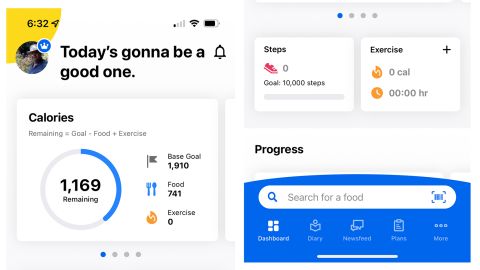
You can sign up for a one-month free trial. The paid account option starts off at $19.99 per month. You can also sign up for a 12-month membership upfront for $79.99.
Though we tested the paid version, we noticed that the free version of MyFitnessPal may be all you need. Unlike some apps where the premium version adds some significant features, the free version of MyFitnessPal can be sufficient for most users.
The premium version of MyFitnessPal eliminates pop-up ads and gives you access to a wider selection of foods. But at a steep $19.99 per month (or close to $240 per year), you might decide you can deal with its free version’s ads.
MyNetDiary Premium offers personalized weight loss plans, meal and exercise planning, food logging, community support, and more. Included in MyNetDiary Premium is support for several types of diets, including Calorie Counting, Keto, Low-Carb, Mediterranean, Vegan, Vegetarian and more.
You can use MyNetDiary Premium as both a web app and a mobile app for Android or iOS mobile devices. MyNetDiary Premium also offers integration with Fitbit fitness trackers, Garmin Connect-enabled devices and with Withings Wi-Fi smart scales, blood pressure monitors and activity trackers.
It was clear to us that MyNetDiary considers itself in direct competition with MyFitnessPal, if only because of the extensive section on its website explaining the differences between the two. And there are important differences, including MyNetDiary Premium’s support for your smartwatch and extensive support for its free version.

We thought using the free version of MyNetDiary was easier than with MyFitnessPal’s free version. For one thing, we weren’t bombarded with pop-up ads and upgrade offers.
In addition, MyNetDiary claims that its database is more reliable than MyFitnessPal’s, with all of the food items in the former being verified. This means that we weren’t as likely to search for a food in MyNetDiary’s database and then get several choices back that were different each time.
MyNetDiary Premium (or paid) account option starts off at $9 per month or $108 per year (paid monthly), which is less than half the annual price of both MyFitnessPal and WW. You can also sign up for a 12-month membership of MyNetDiary Premium — paid upfront — for $60.
Noom offers one-on-one coaching with a coach, support groups facilitated by a group coach and daily lessons. Noom’s daily lessons were intended to help us with our weight loss journey. The lessons were aimed at the psychology of weight loss which, the company says, would help build our confidence.
Noom also offers tools for food logging and calorie and exercise tracking. Its calorie tracking feature proved to be similar to the other weight loss apps we tested, but some of Noom’s results mystified us during testing.
For example, when we tried to track more than one cup of coffee during a meal, we got dropped into a part of the app where coffee is measured by the bowl, not the cup — and the size of the bowl is not given. It took us an extra step to track our two cups of coffee.
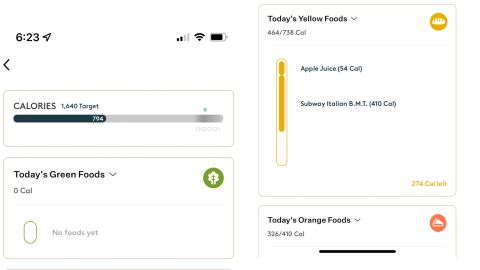
To us, Noom, the company, appears to have positioned itself as the alternative to WW in its ads and positioning. Noom makes a point of stressing that its app is based on psychology rather than on simply counting calories. This may be why the company has recently introduced a stress management program in addition to weight loss.
You can use Noom as both a web app on your desktop or laptop computer, and as a mobile app on Android devices or iOS mobile devices such as the Apple Watch. On iOS, Noom syncs with a wide range of health and fitness apps, but the company says the app “only syncs your steps and weight information. If you want to sync blood pressure or blood glucose data, you’ll need to use a compatible monitoring device. If the app you’re syncing with Noom only tracks step data (not weight), then the step data will show up in Noom.” The list of compatible apps it can integrate with includes Fitbit, Garmin, iHealth, Misfit, Omron, Polar, Qardio, Runkeeper, Withings and Yoo.
You can sign up for a seven-day free trial of Noom. The paid account option starts off at $60 per month (which comes to approximately $720 per year, paid monthly). But it’s also available in multiple-month timeframes, paid upfront. For example, you can pay for a 12-month membership — upfront — for $199.
WW (formerly, Weight Watchers) is probably the best-known weight loss program around. The program is known for its in-person weekly meetings in which members are motivated by peer contact and advice from professional leaders. WW is now also available through a weight loss app that will lead you through the program.
The WW app offers customized food plans, meal planners, a smartphone barcode scanner for easy shopping, and a restaurant and recipe database with over 11,000 recipes. It also provides on-demand workouts with the ability to sync with fitness trackers, 24/7 live chat with a coach and weekly progress reports. It also lets you track your activity, food and water intake, and weight.
A significant difference is that the WW app — like the in-person program — does not count calories. Rather, the app assigns you a “PersonalPoints Budget,” with an individualized ZeroPoint foods list. The points for each food item are based on a number of criteria for each type of food. ZeroPoint foods are food items that contain zero points. Each user is assigned a daily point target within their PersonalPoints Budget, with the idea that, by staying within the recommended points budget, the user will lose weight.
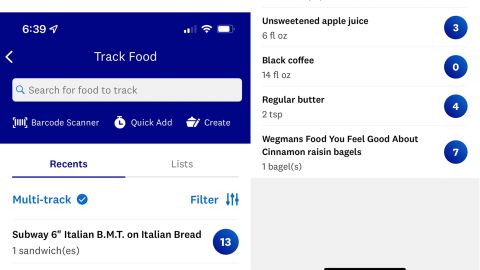
However, we found the points system in the app to be confusing. This was because points assigned to a food item differed depending on factors other than the characteristics of the food itself. And those differences depended on which of the many customized plans WW uses. So, you might find that some fresh fruit contains zero points assigned in your plan but the fresh fruit does contain points in another user’s plan. These differences in the app made choosing food while shopping or in meal preparation difficult for us.
In addition, WW seems to change its plans annually, which means you may have to relearn the program and app each year. Fortunately, though, we thought WW seems to be based on sound nutritional principles, so we thought we were healthy while using the app.
You can use WW as both a web app and a mobile app for Android or iOS mobile devices. The WW app syncs with the WW Body Analysis Bluetooth Scale (made by Conair) and auto-tracks your weight for you. The WW app syncs with Fitbit, Google Fit and Withings activity trackers.
WW’s paid account option starts off at $19.99 per month. You can also sign up for a 6-month membership upfront for $113.99. The app is also included with all WW memberships.
Read more from CNN Underscored’s hands-on testing and fitness coverage:
.